











Anyone who’s bought an eReader can tell you how difficult it can be to choose which to buy. It can take weeks of researching brands, deciding which model is most suited for your needs, and comparing the costs of all the different options to determine which features are essential. For those who may be brand new to the world of eReaders and eBooks, we wanted to ensure you make the best decision for the most reasonable price without having to scour countless articles and YouTube videos.

So for anyone who is looking to buy their first eReader — or looking to switch brands — and is unsure of where to start, we will break down everything you need to know about the top eReaders on the market. By comparing their companies, prices, and unique features, we can help you make the best-informed decision.
How to Get Started
We recommend you identify which key features are essential for your eReader before reading this article: do you need it to have physical page-turning buttons or color? Will you be jotting down notes and highlighting them? What is your budget? If you know these questions, finding the right eReader will be much easier.
While there are many companies offering eReaders, this article will focus on the three dominating the market today: Amazon Kindle, Rakuten Kobo, and the Barnes & Noble Nook. As we draw comparisons, we will be analyzing criteria such as size, battery, screen features, file and audio support, price, and company value.
Kindle
By far the most common and well-known option thanks to it being an Amazon property, the Kindle is often the go-to choice for readers. Amazon has a lot of Kindle options, each with its own exclusive features.
Our Top Kindle Choice: Kindle Paperwhite 2024 (16GB)
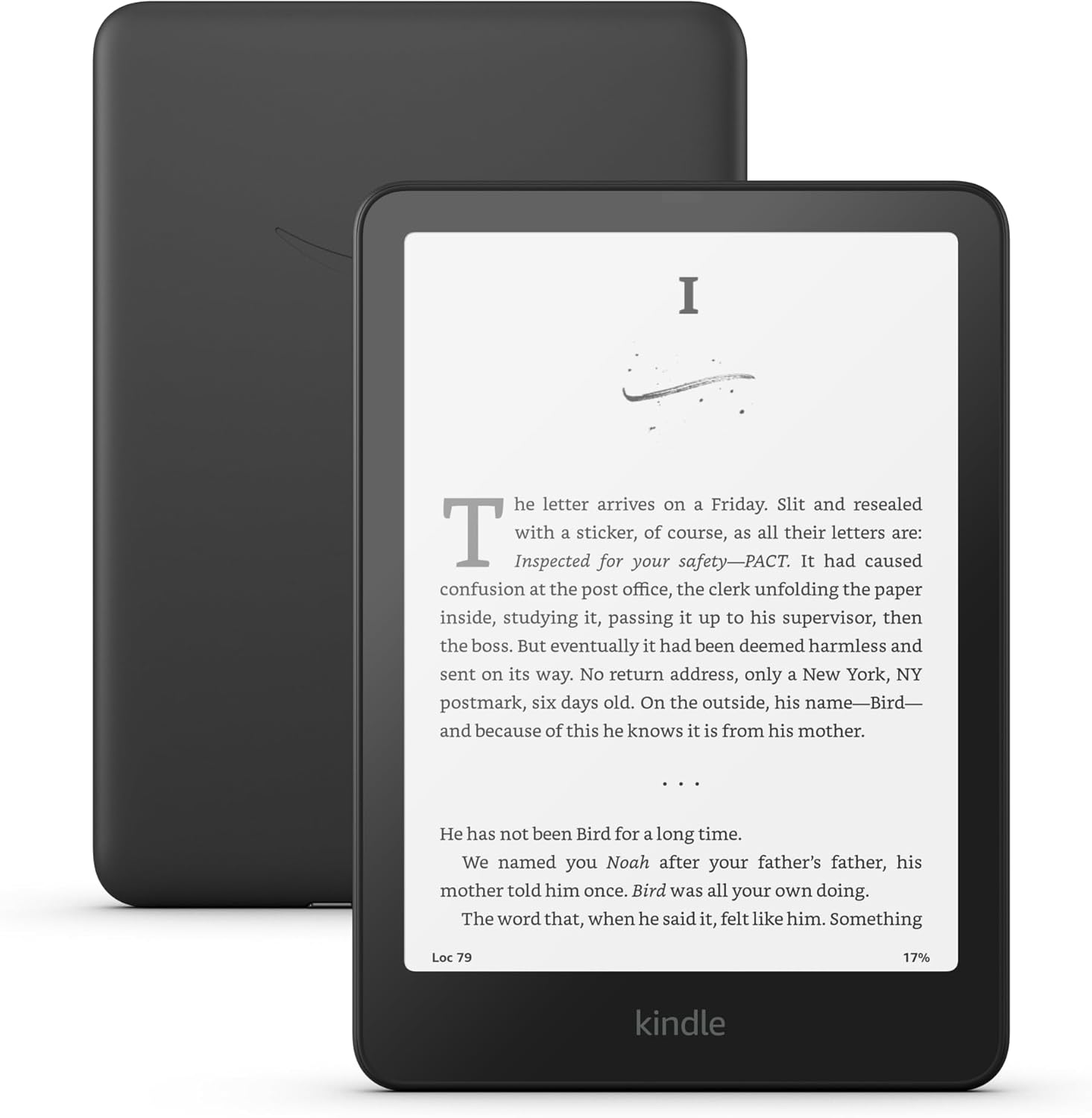
- Price: $156.79
- Size: 5” x 7” x 0.3” glare-free screen with ultra-thin design perfect for travel
- Battery: 12 weeks, single charge!
- Screen Features: Black and White screen, automatic, flush-faced with bezel, adjustable brightness display
- File Support: MOBI KFX, EPUB (w/ restrictions), audiobooks
Benefits of the Kindle include (paid) access to Kindle Unlimited, integrated Goodreads, and waterproofing. While it’s definitely on the pricer side, if features like Kindle Unlimited and Goodreads and its long battery life matter to you, it will be well worth it. For a slight upgrade, you can get the Kindle Paperwhite Signature Edition (2024), which has the same features plus auto-adjusting light and wireless charging for a $195.99 price tag. The big con of the Kindle Paperwhite (not including the price) is the lack of color display; the screen only offers a grayscale interface. Additionally, buyers who are trying to avoid Amazon products may be drawn more to non-Amazon options.
Other Kindle Options
Standard Kindle (16 GB) $110

Cheaper at $107.79, smaller at 6”, and with lower battery life and storage, people often like this standard option because it’s very travel-friendly. The design isn’t as sleek and the device is not waterproof like the Paperwhite, but it does its job as an eReader. If you want a budget-friendly option and you don’t care about the bells and whistles, this might be more your speed.
Kindle Colorsoft Signature Edition (32GB) $274.39

Essentially the Kindle Paperwhite Signature with a color display. For some, this can elevate the reading experience, especially being able to see full-color book covers on their screen. Keep in mind there have been user complaints about the inconsistent functioning of this eReader, so the risk of paying close to $300 for a device with a spotty track record is higher than usual.
Kobo
One of the lesser-known brands of eReaders, Kobo boasts competitive features and a positive user experience without having to shell out big bucks toward a large retail corporation (we’re looking at you, Amazon). Thus, it’s risen in popularity amongst eReader devices. Users often comment that while the Kindle has a higher-end, sleeker screen and feel, the Kobo is tailored for readers and works to make their experience as satisfying for people as they can.
Our Top Kobo Choice: Kobo Libra Colour (32GB)

- Price: $227.69
- Size: 7” glare-free screen
- Battery: 21 hours
- Screen Features: Touch-screen, color, adjustable brightness display, full rotation capabilities
- File Support: MOBI PDF, RTF, EPUB HTML, TXT, audiobooks (Dropbox, Pocket, and Google Drive
The Kobo Libra Color has several standout features. First, it has page-turning buttons (which were available on the Kindle Oasis but discontinued), which keeps the reading experience comfortable, and you can rotate the eReader to easily switch between hands. It’s compatible with the Kobo stylus (sold separately), so the user can take notes and highlight in color directly on eBooks as well as the built-in notebook. While there is no integrated Goodreads, Kobo provides you with its own reading stats for each book.

Probably one of the biggest pulls of buying a Kobo is the built-in OverDrive (now Libby) feature, which allows you to directly access books from the library instead of having to transfer them from your computer or smartphone to the eReader. There is also Kobo Plus — the company’s version of Kindle Unlimited — which works virtually the same way, so users can still access that subscription experience (if that is what you desire).
While it’s more expensive than the Kindle Paperwhite, it’s cheaper than Kindle’s color eReader counterpart and comes with more features. If you want a button reading experience with easy library access, color, and writing capabilities and do not want to buy an Amazon product, this is the eReader for you!
Other Kobo Options
Kobo Clara BW (16GB) $138.58

This is more akin to the Standard Kindle, a classic eReader, just Kobo’s version. It doesn’t have the super-fancy features like stylus compatibility or buttons, but it is still fundamentally an eReader, just with a 6” instead of a 7” screen. If you don’t care about any of those extra features and need to go with a cheaper option that’s still got the essential functions, this Reader is a good buy.
Kobo Sage (32GB) $269.99

The Kobo Sage is a black and white Kobo Libra Colour with an 8-inch screen. Virtually everything else is the same. The resolution is slightly higher on the Sage, so it depends on what users value more. The biggest advantage of the Sage is it feels like more of a notebook because of its larger screen, like an E-ink tablet and eReader combined.
NOOK
Barnes & Noble is a national powerhouse of a bookseller, and their eReaders have been around for a while but are slowly losing traction. Their last eReader release was in 2023 with the NOOK GlowLight 4 Plus and in 2024, they announced several models to be discontinued in 2024. Despite the recent struggles, the Nook is still a solid option and shouldn’t be discounted when deciding what’s right for you.
Our Top Nook Choice: NOOK GlowLight 4 Plus (32GB)

- Price: $179.99
- Size: 7.8” glare-free screen, soft-touch finish
- Battery: 2 weeks
- Screen Features: flush screen, Adaptive GlowLight® illumination technology, warm color option for bedtime reading
- File Support: EPUB, PDF, audiobooks
What’s really unique about the NOOK is that physical page-turning buttons have been built into their models from the very start. Like most eReaders, they are waterproof plus have Bluetooth capabilities and a headphone jack (you don’t see those much anymore), so users can listen to audiobooks, but that’s about where the features end. It’s the base eReader on a budget.
If you just need the nuts and bolts and you live in the United States, this is for you. Unfortunately, it’s not compatible with international use and doesn’t have great integration with libraries for borrowing eBooks. Since the selection of NOOKs is so few, this top choice is the only eReader we’d recommend that balances features and price right.

We hope this guide helped you narrow down your options and that you are one step closer to buying the best eReader for your needs!
If you want to learn more about the history of ebooks, click here!
If you want more great reads, check out Bookstr’s Team Recommendations on the Bookshop shelf here!